

AI document analysis uses software to turn document content into something easier to search, structure, compare, or question. The useful version does more than produce fluent text: it helps you trace an answer back to the passage that supports it.
That distinction matters. A polished answer can still be incomplete or wrong. A cited answer gives you a faster route to verification, but the reader still has to check the source.
What AI document analysis includes
“Document analysis” covers two related kinds of work.
Structured document processing identifies and extracts elements such as text, tables, key-value pairs, fields, or document types. Microsoft’s Document Intelligence overview and Google Cloud’s Document AI overview describe these extraction and classification workflows.
Language-based document analysis helps a reader work with meaning. Common jobs include:
- Asking a specific question about one document or a collection
- Summarizing a long report for a defined audience
- Comparing methods, findings, terms, or risks across documents
- Finding every passage related to a concept, even when the wording differs
- Turning repeated facts into a reviewable list or table
The two approaches can be combined, but they are not interchangeable. A tool that extracts invoice fields is solving a different problem from a tool that compares the conclusions of five research papers.
How a cited answer is produced
Many document-question systems use a retrieval-augmented generation workflow. The original retrieval-augmented generation paper describes combining a language model with retrieved external information rather than relying only on what the model learned during training.
In practical terms, the workflow usually has five stages:
- Prepare the document. The system reads the available text and separates it into passages that can be searched.
- Represent and index passages. Each passage is stored in a form that lets the system find meaning, not just exact keyword matches.
- Retrieve candidates. When you ask a question, the system selects passages that appear relevant.
- Draft the answer. A language model answers using the retrieved context.
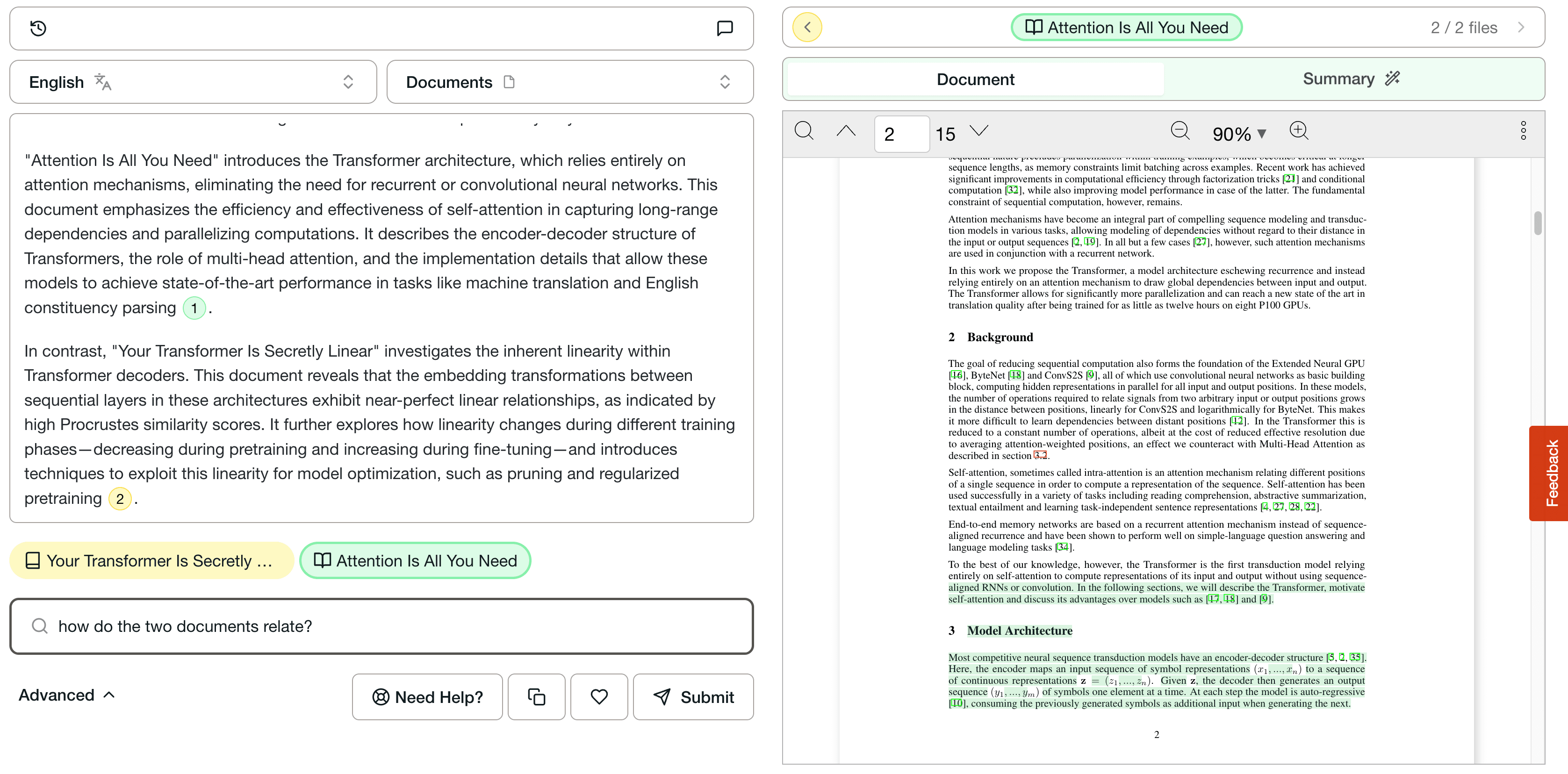
- Attach evidence. The interface connects claims in the answer to source passages, pages, or documents.
This process can reduce the amount of material you read before finding the likely answer. It does not guarantee that the right passage was retrieved, that the answer interpreted it correctly, or that important contradictory evidence was included.
What citations do and do not prove
A citation is useful when it shortens the path between a claim and its evidence. The strongest interfaces let you open the cited location, see the surrounding passage, and decide whether the answer matches it.
Citations can help you check:
- Whether the source actually supports the sentence beside it
- Whether a number, date, definition, or qualification was preserved
- Which document contributed each part of a comparison
- Whether the answer omitted context immediately before or after the cited line
But a citation is not a correctness badge. A system can cite an irrelevant passage, overstate what a passage says, or retrieve only one side of conflicting evidence. Even the RAG paper notes that factual grounding and provenance remain research problems.
For consequential work, treat the generated answer as a guided reading aid. Open the cited passages, inspect the original document, and apply your own subject-matter judgment.
Questions, summaries, comparisons, and extraction
Different document jobs need different review methods.
Question answering
Use focused questions when you know the fact or relationship you need. “What exclusion criteria did the authors use?” is easier to verify than “What is this paper about?” Ask one question at a time and look for citations that cover every part of the answer.
For a practical workflow, see how to ask questions of PDFs.
Summarization
A summary compresses the document, so omissions are unavoidable. State the audience, the sections that matter, and the facts that must be retained. Then compare the summary with the executive summary, conclusions, and any section carrying the decision-critical evidence.
The long-report summarization guide shows how to turn a broad request into smaller, cited questions.
Comparison
Comparison works best when every document is evaluated against the same dimensions. Define the fields first, such as population, method, time period, result, limitation, and funding source. Require a source for each populated cell and leave a field blank when the document does not state it.
The research-paper comparison guide gives an example structure.
Extraction
Extraction turns repeated document elements into structured data. Before trusting the output, sample records from different document layouts, check how missing values are represented, and compare totals with the source files.
For a source-checking workflow, see how to analyze SEC filings with cited answers.
How to evaluate an AI document analysis tool
Evaluate the workflow with documents you are allowed to use and answers you already know. A small, difficult test set is more revealing than a polished vendor demo.
- Choose representative documents. Include long files, tables, footnotes, similar terminology, and at least one question with no answer in the source.
- Write answerable and unanswerable questions. A trustworthy workflow should distinguish missing evidence from a confident answer.
- Inspect retrieval, not just prose. Open every citation and judge whether the retrieved passage supports the adjacent claim.
- Test comparisons for consistency. Check whether the same field is interpreted the same way across documents.
- Record meaningful errors. Separate unsupported claims, missed evidence, wrong numbers, and incomplete answers. Those failure types lead to different decisions.
- Review privacy and access controls. Confirm where documents are processed, who can access them, and whether the setup fits your obligations.
The NIST AI Resource Center recommends testing, evaluation, verification, and validation as part of trustworthy AI practice. For document tools, that means judging the evidence path as carefully as the generated answer.
Where DocuAsk fits
DocuAsk is built for asking questions, summarizing, searching, and comparing across document collections. In its public PDF trial, you can provide a public PDF, ask a question without creating an account, and receive an answer with clickable inline citations. Opening a citation takes you to the supporting passage so you can inspect it in context.
That makes DocuAsk useful when the core job is finding and checking information inside documents. It does not remove the need to read source material, and it should not be treated as an authoritative database or a substitute for professional judgment.
The best test is a document you understand and a question whose answer you can verify. Judge the tool by the quality of the evidence it surfaces, not by how confident the answer sounds.
If you are evaluating a specific document assistant, the Coral AI pricing and DocuAsk comparison separates verified pricing from uncertain third-party listings and provides a side-by-side testing checklist.